
Configure the Zebra printer
To print labels in PDF or ZPL format with the Zebra printer, it is necessary to configure the printer in the appropriate mode.
PDF format labels
To print labels in PDF format with the Zebra printer, it is advisable to set the Windows Printing Preferences by entering the dimensions in millimeters of the labels used. You can do this by following the indicated path:
“Printers & scanners” > Select the printer and click on “Manage” > “Printing preferences” > Options


ZPL format labels
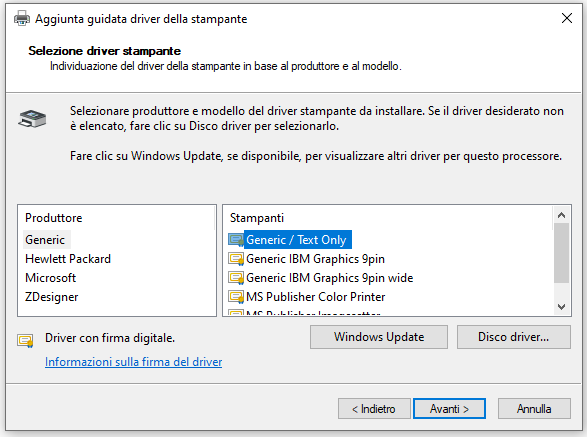
The Zebra printer or compatible must be installed as “Generic / Text Only”.
It is possible to set this mode by accessing the Windows Printer Properties through the following path:
“Printers & scanners” > Select the printer and click on “Manage”
“Printer properties” > “Advanced” > “New Driver”

Need help?If you need assistance, contact Qapla’s Customer Care at support@qapla.it